About Call Of Duty: BLACK OPS
There is a new version of Call of Duty coming out. It is called Call of Duty Black Ops. Black Ops in my opinion has recreated Modern Warfare. Black Ops features something new called "Call Of Duty Money". I don't have all the information but I am working on it.
Information About the Creator
You can find the real creator of Call of Duty Black Ops on twitter. His name is Josh Olin. His twitter username is: JD_2020.
Releasing Date
I believe that Call of Duty Black Ops will be released on November 7th 2010. It will be in-store and is right now available to pre-order at any game store, just ask someone about pre-ordering Call of Duty Black Ops.
Saturday, September 18, 2010

I forgot!
Sorry, After our blogs had been marked by our Computer Teacher, I had totally forgotten about this blog but now that is all gone. From now on, I am going to be posting on this blog. Feel free to ask me questions but please remember to have some identification when you leave your comment so that I can refer to you when responding to your comment.
Sunday, June 20, 2010
A Quote For Guinness World Record Gamer's Edition 2009
"If your a gamer, then you need this on your shelf"
PSW Magazine
PSW Magazine
The First Batman Game
The legendary caped crusader's first video-game appearance came in Batman, published by OCEAN SOFTWARE in the UK in 1986 for the ZX Spectrum home computer. The devious isometric platform adventure was created by just two people - programmer Jon Ritman and artist Bernie Drummond.
Information tooken from:
Guinness World Records 2009 Gamer's Edition
PLEASE BE ADVISED THAT THE INFORMATION DATES BACK TO 2009. IN OTHER WORDS, THIS INFORMATION WAS FROM 2009.
Information tooken from:
Guinness World Records 2009 Gamer's Edition
PLEASE BE ADVISED THAT THE INFORMATION DATES BACK TO 2009. IN OTHER WORDS, THIS INFORMATION WAS FROM 2009.
The Simpsons - Medal of Honor
Medal of Honor turned into a parody in episode 13 of the simpsons game. The stage called it Medal of Homer has you playing as Bart and homer. You are collecting white flags from a french town and then you are rescuing some stolen paintings from a warship.
Friday, June 18, 2010
Another Way of using Xbox 360
Instead of using a T.V to play your game you can also use a computer screen. STOP! You must get a VERY special screen. Unforchantly I do not know the kind of screen that you use.
Wii Sports Resort
Wii Sports Resort is basically the next version of Wii Sports. It features new sports. Such as Skiing. I don't have it so I don't know if it will get you more fit. (I will continue on this post later...)
New Xbox 360
A few days ago, Microsoft realeased a new version of Xbox 360. It has the same objective of Wii Fit. It also helps to go totally hands free. It will also help you get Fit. I don't know if it will have the same effect as Wii. 1 in 4 kids are obese and most of those kids enjoy gaming. Thats what exer-gaming is. Exer-gaming is a game or console that is designed to make you play but at the same time you are getting exercise or physical education. It is the same size as a wii.
Thursday, June 17, 2010
Forza Motorsport
Forza Motorsport is a game for both Xbox & Xbox 360. The game subject is cars & driving. You can verse another player or you can verse a ghost. In my opinion, ghosts go faster than regular cars do. A reflection on Forza: Just Racing Forza will not make you a pro-racer, but if you take some racing classes first, and then go play Forza, your racing skill will improve dramatically. You can also design cars and unlock cars. It is a little bit similar to a game called Burnout Revenge.
Sunday, June 13, 2010
Xbox 360 = No T.V!
Did you know that there is another way of playing xbox 360. Instead of using a T.V. you can use a computer screen. BUT you must get a very special kind of screen. Unforchantly, I don't know what kind of screen.
Saturday, June 5, 2010
Super Mario Galaxy 2 - Nintendo Wii
It may be easy to take one look at Super Mario Galaxy 2, see the same gravity-altering traps and spherical worlds from its predecessor, and dismiss this as a by-the-numbers sequel to the superb original. But by assuming you know what to expect from Mario's latest adventure, you would be doing yourself and this game a great disservice. This is not only the new standard against which every 3D platformer must now be judged, but it also seamlessly integrates so many elements from Mario's 2D roots that it stands toe-to-toe with even its genre-defining progenitors. Every aspect of this game is absolutely bursting with joy. The vibrant artistic design immediately welcomes you into this colorful world, and the catchy soundtrack deftly mixes classic tunes with new compositions to provide the perfect backdrop for your goomba-stomping, star-snatching fun. But it's the expertly designed levels that will keep you coming back, even after you've seen everything this game has to offer, just to experience it one more time. This is an instant classic that belongs alongside the best games Nintendo has ever created.
Friday, June 4, 2010
Call of Duty Modern Warfare 2 - Ratings
Call of Duty Modern Warfare was rated 9.0 by GameSpot. The ESRB rated it "M" for Blood, Drug Reference, Intense Violence, Language.
Left 4 Dead 2 - Rating and ESRB Rating
Left 4 Dead 2 was rated 9.0 by GameSpot. The ESRB rated Left 4 Dead 2 as "M" for Mature. (17 and Up.)
Splinter Cell Conviction - Xbox 360 - Rating
Splinter Cell Conviction for Xbox 360 was rated 8.0 by GameSpot. ESRB rated it "M" for Mature.
Sunday, May 30, 2010
Thomas Toliver Goldsmith, Jr. - Biography and Information
Biography
Goldsmith was born in Greenville, South Carolina on January 9, 1910.[1][2][3] He received his B.S. at Furman University in Greenville in 1931, in physics, and his Ph.D. from Cornell University in 1936, under the supervision of Dr. Frederick Bidell.[2][3][4] After graduating from Cornell, he became director of research for DuMont Laboratories, and (after 1953) vice president;[5] he chaired the Synchronization Panel of the National Television System Committee and also the Radio Manufacturers Association Committee on Cathode-Ray Tubes.[3] He also became the chief engineer for the DuMont Television Network;[6] television station WTTG, formerly in the DuMont network, is named for his initials.[7] In 1966 he left DuMont to become a professor of physics at Furman,[1] and he retired to become an emeritus professor in 1975.[4] He died on March 5, 2009 in Lacey, Washington.[8]
The first arcade game with a CRT
U.S. Patent 2,455,992, granted to Goldsmith and Estle Ray Mann in 1948, describes what may be the world's cathode ray tube based game and patent, and was inspired by the radar displays used in World War II.[9] Entitled "Cathode Ray Tube Amusement Device", the patent describes a game in which a player controls the CRT's electron gun much like an Etch A Sketch. The beam from the gun is focused at a single point on the screen to form a dot representing a missile, and the player tries to control the dot to hit paper targets put on the screen, with all hits detected mechanically. To make the game more challenging, its circuits can alter the player's ability to aim the dot.Awards and honors
Goldsmith was a Life Fellow of the Society of Motion Picture and Television Engineers.[10] In 1949, he won an Institute of Radio Engineers Award "For his contributions in the development of cathode-ray instrumentation and in the field of television."[11] In 1979, the Radio Club of America honored Goldsmith with the first Allan B. DuMont Citation for "important contributions in the field of electronics to the science of television".[12] In 1999, Goldsmith won the first Dr. Charles Townes Individual Achievement Award as part of the Innovision Technology Awards competition honoring innovation in the upstate South Carolina area.[13] A comprehensive collection of artifacts and ephemera of his life and his inventions is housed in the Library of Congress. In 1967, he was selected as an honorary member of Phi Mu Alpha Sinfonia, the national men's music fraternity, by Furman University's Gamma Eta chapter, which confers an annual award, in Goldsmith's honor, to the university's rising senior non-music major student who does the most to advance music in America.I own NONE of this....it came from: http://en.wikipedia.org/wiki/Thomas_T._Goldsmith,_Jr.
Wolfenstein - Xbox 360
My brother just rented Wolfenstein from BlockBuster and it is awesome. Me and my brother play it together.
Saturday, May 29, 2010
Gaming News - Super Mario Galaxy 2
I recently realized that Nintendo will be making Super Mario Galaxy 2. I don't know what gaming system it will be for.
Nintendo DSi

http://wengyuen.files.wordpress.com/2009/10/nintendo_dsi_handson.jpg
This is what a Nintendo DSi looks like. Nintendo DSi is the newest version of the DS.
Friday, May 28, 2010
Super Mario Galaxy 2

Nintendo Will be making a Game called Super Mario Galaxy 2. This is what the front cover of the game looks like.


Wii Fit - Nintendo Wii
The Wii Fit is a game that has games that are requiring you to move physically. That is also called Exer - Gaming. This helps children that are obese or overweight lose weight by playing a game. It is also just keeps kid healthy and fit. There are a number of games to play. There are Aerobic Games. One of the games are Hula Hoop. In this game you stand on your Wii Fit Balance Board and spin your hips in nice large circles. There are 2 people that are on the right and on the left. They throw you Hula Hoops then you have to stretch you arms to the right or left. Thats how you catch the hula hoop.
Left 4 Dead 2 - About & Characters
Left 4 Dead 2 has just came out and it is a totally cool game. The game subject is Zombies and bloody stuff. There are a lot of characters. Left 4 Dead 2 features 5 new campaigns. The Witch likes to cry basically. If you come across turn off your flashlights and try to sneak around her. You also can kill her but she runs REALLY FAST and scratches you. Once your scratched your down and a teammate has to help you. You will also have to get healed by a teammate because you have so little health. When your down you can still shoot the witch to hopefully kill her. Your teammates will help you by also shooting at her. The next character is The Boomer. The Boomer Bile will try to puke this green stuff on you. The Boomer Bile will do that because the puke actually attracts the horde. The horde is the plain zombie people. There are certain things that will trigger The Horde to start coming. 1 thing is that if you shoot car's that have a light blinking in them...the car alarm will go off. That will trigger The Horde to start coming at you. The litterally bit the flesh off of you and then that is when your health goes down. The Witch looks really weird. She is usually in a room just crying. You can always hear her cry when your about to go into a room where she is.
Thursday, May 20, 2010
I'm confused about two players playing one game - Xbox 360
When there are more than one person joining or playing the game then it will show the logged in profiles name 2 times. For example if your profile name is: AllAboutGaming, and 2 people are playing then it will say this:
AllAboutGaming
AllAboutGaming[1]
The player that has one at the end there name is the 2nd player. That means that there is 1 other player playing. So that is why there is a [1] at the end of it. If another person joined then your xbox 360 will say this:
AllAboutGaming
AllAboutGaming[1]
AllAboutGaming[2]
There are two extra players playing so that is why it says that.
Jacob-AllAboutGaming.blogspot.com
Are there other ways to use my WiiMote Charger?
Yes. There are actually more ways of charging your WiiMotes. You can also connect it to your computer and then it will also start to charge your WiiMotes. It will because your computer is on so in that case it will start to charge your WiiMotes.
Saturday, May 15, 2010
Troubleshooting - My WiiMote charger isn't working!
First of all... The Wii must be powered up before the Wii Remote will charge the WiiMotes. So make sure that your Wii is fully powered up. Instead of starting up your whole Wii, turn on WiiConnect24. The Wii is half on when the Yellow light is signaled. The Wii is half on because it has to connect data to update the News Channel and the Weather Channel. So it will be on. Second of all.. the Charger should come with rechargeable batterys. On my WiiMote charger, the Red Light signals that it is charging, and the Green Light signals that it is done charging.
Jacob-AllAboutGaming.blogspot.com
Jacob-AllAboutGaming.blogspot.com
Friday, May 7, 2010
Troubleshooting - My Wii isn't reading the game!
There are 2 reasons why your Wii might noy read the game. The 1st reason: You might have placed it the wrong way in. All the writing and stuff should be facing the right. The 2nd reason: The game you have placed in, might have been scratched. Go to your local Video Store or your nearest BlockBuster and have them clean. (I DO NOT know how much it costs) Then put it in your Wii and try it. If none those work, I'm afraid that your going to have to return the game to the store and get the same kind of game except from a different store or you can buy another game.
Jacob-AllAboutGaming.blogspot.com
Jacob-AllAboutGaming.blogspot.com
Thursday, May 6, 2010
How to lock your PSP - The 2nd Version
This is the 2nd way of locking your PSP. Except this time, you can COMPLETELY lock your PSP. Where the power button is, push it down. You will hear a slight click. At the top right corner, beside the date (example ->) 5/6, you will see a key. That means that the WHOLE PSP IS LOCKED!
(You're Welcome)
Jacob-AllAboutGaming.blogspot.com
(You're Welcome)
Jacob-AllAboutGaming.blogspot.com
Daxter - PSP
Daxter is a fun game for PSP. The game subject is Bug Extermination. All though the game you are killing bugs. There are these weird looking spiders that have wings but never fly. It has yellow eyes. And makes a funny noise. When you get to the construction site, there is this fly that stings you and makes the sound a sword makes when you swing it. The funny thing about it though, is that you can kill them in one hit. There are also these snake things that pop up from this pile of dirt. They are dark green & also have yellow eyes. A lady will give you some spraying thing (I don't know what it is called) and you spray them with it and hit them with your taser thing (Again, I don't know what it is called) and hit them a few times and then you will kill it. They can also shoot this blue thing at you, and there is no way that you can stop that unless you kill it. Breezy Valley is a really hard mission for me. You are flying around and collecting this spray thing (I don't even know what this is called) that is bright green. You have to fly over plants that are infested by bugs and then you press the Left Bumper to spray the green thing and kill the bugs so that the plants can actually live. You have a total of 1 Minute (60 seconds) to do all of that. It is an AWESOME GAME! You should buy it, but it usually comes in a bundle will the brand-new White, Blue, Black, or Red PSP 3000.
Jacob-AllAboutGaming.blogspot.com
Jacob-AllAboutGaming.blogspot.com
Nintendo DS - About Pictochat
Pictochat was designed for DS users to be able to chat with other people within 50 feet. You can use the keyboard or you can use the little pen to write. There are 4 - 5 chatrooms in which any user may choose. You can also make other symbols. At the top left corner, there is a bar. That bar shows how strong the connection between you and the other partie is. When it is red, the connection not strong at all. When it is orange, the connection is averagely good. Green shows that the connection is excellent. The power light will continusly blink green, signalling that the DS has enough energy to power it and because it is using Wi-Fi connection. If the battery is low, the light will continusly blink red, signalling that the battery is low & that it is using Wi-Fi connection. The DS will try to make a stronger connection when there is a full battery. However, when the battery is low it will not try to make the connection stronger.
Jacob-AllAboutGaming.blogspot.com
Jacob-AllAboutGaming.blogspot.com
Using Xbox Games on Xbox 360
It is possible to play SOME games on your Xbox 360 that are for the old xbox. Games that are platinum are able to play on the Xbox 360 and the old Xbox. On the top of the front cover should say platinum or not. If the game does not say platinum, the Xbox 360 will not be able to read it. Just like Microsoft Word 2003 cannot read Microsoft Word 2007 Documents, the Xbox 360 won't be able to because you are basically using a old game on a newer version. Which therefore makes it not possible for the Xbox 360 to read the game.
Jacob-AllAboutGaming.blogspot.com
Jacob-AllAboutGaming.blogspot.com
Troubleshooting - Xbox 360 won't turn on!
There isn't many reasons why your xbox 360 shouldn't turn on, but it's possible. Make sure that the Xbox 360 cable is plugged into the back of the Xbox and into a plug. Make sure that the power box isn't broken. If you are plugging your xbox into an extension like this:

Then make sure that it is turned on. If none of those help you...you might consider calling Microsoft or visiting the troubleshooting in your Xbox 360 manual.
Jacob-AllAboutGaming.blogspot.com
Jacob-AllAboutGaming.blogspot.com
Why is my Wii Light Yellow?
The yellow Wii light signals that you have WiiConnect24 on. The yellow light also signals that the Wii is still receiving data from other satellites to update the News Channels and the Weather Channel. So don't get too scared if it goes yellow. It will get HOT if you have it a suffocating place. So make sure that it is able to be ventilated.
Jacob-AllAboutGaming.blogspot.com
Jacob-AllAboutGaming.blogspot.com
Wii Disc Tray
The Wii Disc tray sucks in the game. That makes the Wii Disc tray more fragile. There is sucktion plus there is a little roller which rolls the game into the Wii. After the Wii does that, the disc tray will light up blue. Signaling that a game has been inserted. Sometimes if you don't take good care of it, the Wii sucktion and roller might not work. In that case, when you insert the game, it will light up blue, but it will not read the game. You will have to get a pair of tweezers to get the game out of the disc tray. Thats why you should always be careful with the disc tray.
Jacob-AllAboutGaming.blogspot.com
Jacob-AllAboutGaming.blogspot.com
Wednesday, May 5, 2010
Xbox Disc Tray
The old Xbox has a disc tray. That tray can break easily. Once you put something on the top of the xbox, the next time you press open, it will not open. It will not open because the top of the xbox squishes the tray. The tray doesn't unsquish itself so it will remain closed. You might be able to hear the xbox desperatly trying and trying to open the tray, but failing. Hit the top of the xbox (Do NOT hit the top hard, put in effort but not TOO MUCH). That should open the xbox tray. I would suggest you make sure that nothing is resting on top of the xbox. Keep the top of the xbox clean of things and the tray should open everytime. The games should NOT break if you have something inside of it. If you hit it hard and there IS a game in there, it might break. There is a 50% chance that it could break. Now..don't go thinking that you can hit your xbox hard just because there isn't a game in there, don't hit it hard because...
Jacob-AllAboutGaming.blogspot.com
- It could damage a game
- It could damage your xbox (itself)
Jacob-AllAboutGaming.blogspot.com
Tuesday, May 4, 2010
Who invented Gaming?
So.....who really did invent gaming? Well...technically there is NO single person who invented gaming. It was a group of 3 people. There names are: T. Goldsmith, Jr. and Estle Ray Mann. They are the people who invented games! A LOT of people enjoy gaming. I think they should have been the most popular people in the world!
Jacob-AllAboutGaming.blogspot.com
Jacob-AllAboutGaming.blogspot.com
The Red ring of Death - Xbox 360.
If you are a person that has a Xbox 360 you are eventually going to get the red ring of death. The red ring cause is unknown because there are many reasons that you might get the red ring of death. My friend had his Xbox 360 get the red ring of death because it wasn't properly ventilated. The short form for red ring of death is "RROD". Once your Xbox 360 has the RROD you must send it to Microsoft and then they will repair it and send it back to you. It will take approximately 4 - 5 Weeks.
Jacob-AllAboutGaming.blogspot.com
- 2 Weeks to be sent to Microsoft
- 1 Week for Microsoft to fix it
- 2 Weeks for it to be sent back to you
Jacob-AllAboutGaming.blogspot.com
DS Start-up Mode
There are 2 Ways that you can set your DS to start up. The first way is for it to automatically start the game when you turn it on. If you would like to change that then do not insert a game and then the DS will go to the Main Dashboard. The second way is pretty obvious. When you turn on the DS, it will go to the Main Dashboard. Never put a game into the DS while it is on, unless it tells you to.
Jacob-AllAboutGaming.blogspot.com
Jacob-AllAboutGaming.blogspot.com
How to link WiiMote to the Wii Gaming System
When more than 1 Person is playing a Wii, you will have to link the WiiMote to the Wii Gaming System. In the Battery Portion at the back of the Wii, take out the cover and then at the bottom right corner you will see a RED BUTTON. On the front of the Wii, on the left side of the disc drive you will see a cover. Open that cover and you will then see a Red Button. PRESS BOTH BUTTONS ON THE WII AND WIIMOTE. The WiiMote will then be linked to the Wii. Repeat that to add more WiiMotes.
Jacob-AllAboutGaming.blogspot.com
Jacob-AllAboutGaming.blogspot.com
About Wii Power Lights and Vents
The common reasons that your Wii Power Light might be different colors is because you have updated or edited something on the Wii. If your Wii Light is YELLOW it is because you have updated the Wii. It happened to me because I updated my Wii so that I can go the the Wii Shop Channel. Once you have updated the Wii, the Wii will then turn on the Weather Channel and the News Channel. The "Yellow" light warns you that the Wii is still receiving data to update the Weather and News Channel then next time you turn on your Wii. While the Wii is off it will get hot because it is basically still working. That isn't a problem if you don't have it in a suffocating place. DO NOT cover the vents. It will block the circulating air in the Wii and the Wii will get damaged because all the air will become warm and then it will make the Wii hot. If the light around the disc drive starts lighting up blue, that means that you have a message in your inbox. Just check the message and then the light will stop. You have the option to take off the light but then the WiiConnect24, News Channel, and the Weather Channels will be turned off because the Wii can not receive updates.
Jacob-AllAboutGaming.blogspot.com
Jacob-AllAboutGaming.blogspot.com
How to connect your Wii to the Internet
This post will tell you how to connect your Wii to the Internet. First you must setup an Internet connect between your Wii and your Internet Modem. You can have a wireless connection or a Wired Connection. I would perfer Wired because if you have it as wireless there is an 50% chance that someone could hack you and steal your Internet Connection. But you could have wireless if you perfer. Once you have done that you must go to Wii Settings. Once you have done that, click Wii Settings (the one closer to the right). Then click the arrow pointing right and then select Internet Connection. You can then choose the connection. If you choose wired, the Wii will then test the connection. It may ask you to update so just update the Wii.
Monday, April 26, 2010
WiiConnect24
First you must setup an Internet connection with your Wii. You may choose to have it as wireless or you could have it as wired. Once you have done that you must go to the Wii Shop Channel and after you have done that it might tell you to update your Wii, if it does tell you that then you just update it. You will then notice that after you have done that the Wii Light will no longer be colored as Red. It will be Yellow. The yellow light signals that WiiConnect24 is on. If the yellow light is on it will cause the Wii to get hot. That wouldn't be a problem if you don't have it in a suffocating place. It will be hot because, even though it is off it is still receiving data from a satelite. So it will get a little hot. If the light around the disc drive starts lighting up blue, that signals that you have a new message. Just check the message and then it will go away. You can take off the blue light and the yellow light if you just go to Wii Settings, then go to WiiConnect24 and choose Standby Connection, then click off. If you do that it will not use WiiConnect24 anymore. WiiConnect24 will also receive data for the News Channel and the Weather Channel.
Thursday, April 15, 2010
Whats on the All About Gaming Blog?
The images that I will be posting into my blog are going to be relevant to what that post will be about. Any picture that I post will be relevant to gaming. I will be pasting images into Word to show people what I am talking about. My blog is about gaming so there won’t be many pictures about anything other than gaming. I will also post pictures of games so that visitors can see what Video Game I am talking about in case they don’t know I am talking about.
What will be on this Gaming Blog
On this blog there will be Gaming Information. There will be less pictures and more text. On this blog I will allow comments so that other people can tell me if they want me to post about something.
Saturday, April 10, 2010
How to Put a Game Into your Wii
Here is how to insert a disc into your Wii:
- Turn on your Wii
- Get the Disc
- On the side that has all the writing and stuff, make sure that the writing stuff is facing right.
- Wait till the wii reads the disc
How to setup your Wii
Here is how to setup your very own new Nintendo Wii. First, start by taking out the components of the Wii out of the Wii. The box will contain...
- Power Cable
- Audio Cable (to connect to your T.V)
- Sensor Bar
- 1 or 2 Wii Controllers
Start connecting the cables to the back of your Wii. Look at the part of the cable that you insert. Try and look for the place to insert it. Once you are done connecting everything. Its time to connect the Audion and Video wires. They are Red, White and Yellow. Plug them into the designated spot on your T.V.
Voila! You're done setting up your Wii. Now its time to have fun playing Wii!
Thursday, April 8, 2010
Patapon 2 PSP Unlockables
Miracles/Jujus
Call down Miracles If you have Obtained these Items, Perform X.XX.XX(DON, DON DON, DON DON) while in Fever Mode
Unlockable How to Unlock
Rain Miracle Finish Mushroom shroom shroom Nyokiri Swamp Mission in the Second Time.
Tailwind Miracle Finish Mystery of the Desert's Sandstorm Mission in the Second Time
Storm Miracle Beat God General of Staff Hookmen
Earthquake Miracle Beat Living Fortress Cannodears LvL 3
Blizzard Miracle Finish Watchtower and Two Karmen Mission
Attack Miracle Beat Invincible Dragon Majidonga LvL 3
Defense Miracle Beat Fearful Tentacle Monster Darachura LvL 3
This information orignally came from:
http://www.gamespot.com/psp/action/patapon2/hints.html?tag=most-popular-cheats%3Btitle%3B5
Call down Miracles If you have Obtained these Items, Perform X.XX.XX(DON, DON DON, DON DON) while in Fever Mode
Unlockable How to Unlock
Rain Miracle Finish Mushroom shroom shroom Nyokiri Swamp Mission in the Second Time.
Tailwind Miracle Finish Mystery of the Desert's Sandstorm Mission in the Second Time
Storm Miracle Beat God General of Staff Hookmen
Earthquake Miracle Beat Living Fortress Cannodears LvL 3
Blizzard Miracle Finish Watchtower and Two Karmen Mission
Attack Miracle Beat Invincible Dragon Majidonga LvL 3
Defense Miracle Beat Fearful Tentacle Monster Darachura LvL 3
This information orignally came from:
http://www.gamespot.com/psp/action/patapon2/hints.html?tag=most-popular-cheats%3Btitle%3B5
Friday, April 2, 2010
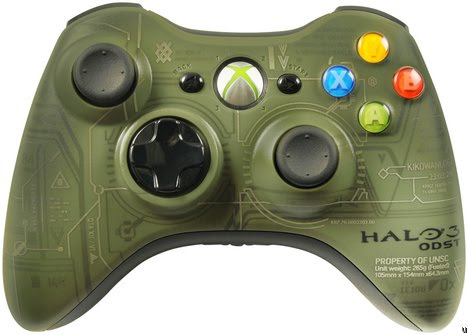
Halo 3 Xbox 360 Cheats
Halo 3 for Xbox 360 Game Cheats:
LB + RB + LS + A + DOWN [D-PAD] Toggle Hide Weapon
LB + RB + LS + A + UP [D-PAD] Toggle Show Coordinates / Camera Mode
[HOLD LS + RS] Press Left on D-Pad Toggle Pan-Cam / Normal while Show Corrdinates is enabled
This Information orignally came from:
http://www.gamespot.com/xbox360/action/halo3/hints.html?tag=most-popular-cheats;title;3
LB + RB + LS + A + DOWN [D-PAD] Toggle Hide Weapon
LB + RB + LS + A + UP [D-PAD] Toggle Show Coordinates / Camera Mode
[HOLD LS + RS] Press Left on D-Pad Toggle Pan-Cam / Normal while Show Corrdinates is enabled
This Information orignally came from:
http://www.gamespot.com/xbox360/action/halo3/hints.html?tag=most-popular-cheats;title;3
Halo 3 Cheat Codes
Hide Weapon, Show Coordinates & Camera ModesThe following cheats can be performed during a local match or replay only. You must simultaneously PRESS & HOLD the following buttons for 3 SECONDS to toggle the effect on / off.
KEYS:
LB = Left Bumper
RB = Right Bumper
LS = Click in on Left Analog Stick
RS = Click in on Right Alalog Stick
Information orignally came from:
http://www.gamespot.com/xbox360/action/halo3/hints.html?tag=most-popular-cheats;title;3
KEYS:
LB = Left Bumper
RB = Right Bumper
LS = Click in on Left Analog Stick
RS = Click in on Right Alalog Stick
Information orignally came from:
http://www.gamespot.com/xbox360/action/halo3/hints.html?tag=most-popular-cheats;title;3
Grand Theft Auto Liberty City PSP Cheats
Here are some cheats for the Game: Grand Theft Auto Liberty City for PSP:
TRIANGLE, R1, L1, DOWN, DOWN, R1, R1, TRIANGLE
All Vehicles Chrome Plated
CIRCLE, RIGHT, X, UP, RIGHT, X, L1, SQUARE
Change Bike Tire Size
DOWN, DOWN, DOWN, X, X, SQUARE, R1, L1
Upside Down Gameplay
DOWN, DOWN, DOWN, TRIANGLE, TRIANGLE, CIRCLE, L1, R1
Have People Follow You
L1, R1, L1, R1, UP, DOWN, L1, R1
Display Game Credits
DOWN, DOWN, DOWN, CIRCLE, CIRCLE, X, L1, R1
Bobble Head World
SQUARE, SQUARE, R1, X, X, L1, CIRCLE, CIRCLE
Aggressive Drivers
TRIANGLE, TRIANGLE, R1, SQUARE, SQUARE, L1, X, X
All Green Lights
L1, DOWN, LEFT, R1, X, CIRCLE, UP, TRIANGLE
Commit Suicide
L1, UP, LEFT, R1, TRIANGLE, CIRCLE, DOWN, X
Perfect Traction
R1, TRIANGLE, X, R1, SQUARE, CIRCLE, LEFT, RIGHT
Slower Gameplay
R1, R1, L1, R1, R1, L1, DOWN, X
Faster Gameplay
L1, L1, CIRCLE, R1, R1, SQUARE, TRIANGLE, X
Sunny Weather
UP, DOWN, CIRCLE, UP, DOWN, SQUARE, L1, R1
Clear Weather
L1, L1, LEFT, L1, L1, RIGHT, X, SQUARE
Destroy All Cars
L1, L1, LEFT, L1, L1, RIGHT, CIRCLE, X
Faster Clock
L1, L1, LEFT, L1, L1, RIGHT, TRIANGLE, CIRCLE
Spawn Rhino
UP, DOWN, SQUARE, UP, DOWN, CIRCLE, L1, R1
Rainy Weather
UP, DOWN, TRIANGLE, UP, DOWN, X, L1, R1
Foggy Weather
UP, DOWN, X, UP, DOWN, TRIANGLE, L1, R1
Overcast Weather
L1, R1, TRIANGLE, L1, R1, CIRCLE, L1, R1
Money Cheat ($250,000)
L1, R1, CIRCLE, L1, R1, X, L1, R1
Full Armor (Blue Bar)
L1, R1, X, L1, R1, SQUARE, L1, R1
Full Health (Red Bar)
X, X, X, DOWN, DOWN, RIGHT, L1, R1
Upside Down Gameplay2
UP, CIRCLE, CIRCLE, DOWN, LEFT, CIRCLE, CIRCLE, RIGHT
Weapon set 2
UP, X, X, DOWN, LEFT, X, X, RIGHT
Weapon set 3
UP, SQUARE, SQUARE, DOWN, LEFT, SQUARE, SQUARE, RIGHT Weapon set 1
L1, R1, SQUARE, L1, R1, TRIANGLE, L1, R1
Raise Wanted Level
L1, L1, TRIANGLE, R1, R1, X, SQUARE, CIRCLE
Never Wanted
CIRCLE, X, DOWN, CIRCLE, X, UP, L1, L1
Cars Drive On Water
X, X, R1, CIRCLE, CIRCLE, L1, TRIANGLE, TRIANGLE
White Cars
CIRCLE, CIRCLE, R1, TRIANGLE, TRIANGLE, L1, SQUARE, SQUARE Black Cars
L1, UP, RIGHT, R1, TRIANGLE, SQUARE, DOWN, X
Raise Media Attention
TRIANGLE, CIRCLE, DOWN, TRIANGLE, CIRCLE, UP, L1, L1
Spawn Trashmaster
Triangle, Triangle, Triangle, Up, Up, Right, L, R
Upside Up
UP, UP, UP, TRIANGLE, TRIANGLE, CIRCLE, L1, R1
Unlock multiplayer skins
All of these cheats are from: http://www.gamespot.com/psp/action/gtalibertycitystories/hints.html?tag=most-popular-cheats;title;1
TRIANGLE, R1, L1, DOWN, DOWN, R1, R1, TRIANGLE
All Vehicles Chrome Plated
CIRCLE, RIGHT, X, UP, RIGHT, X, L1, SQUARE
Change Bike Tire Size
DOWN, DOWN, DOWN, X, X, SQUARE, R1, L1
Upside Down Gameplay
DOWN, DOWN, DOWN, TRIANGLE, TRIANGLE, CIRCLE, L1, R1
Have People Follow You
L1, R1, L1, R1, UP, DOWN, L1, R1
Display Game Credits
DOWN, DOWN, DOWN, CIRCLE, CIRCLE, X, L1, R1
Bobble Head World
SQUARE, SQUARE, R1, X, X, L1, CIRCLE, CIRCLE
Aggressive Drivers
TRIANGLE, TRIANGLE, R1, SQUARE, SQUARE, L1, X, X
All Green Lights
L1, DOWN, LEFT, R1, X, CIRCLE, UP, TRIANGLE
Commit Suicide
L1, UP, LEFT, R1, TRIANGLE, CIRCLE, DOWN, X
Perfect Traction
R1, TRIANGLE, X, R1, SQUARE, CIRCLE, LEFT, RIGHT
Slower Gameplay
R1, R1, L1, R1, R1, L1, DOWN, X
Faster Gameplay
L1, L1, CIRCLE, R1, R1, SQUARE, TRIANGLE, X
Sunny Weather
UP, DOWN, CIRCLE, UP, DOWN, SQUARE, L1, R1
Clear Weather
L1, L1, LEFT, L1, L1, RIGHT, X, SQUARE
Destroy All Cars
L1, L1, LEFT, L1, L1, RIGHT, CIRCLE, X
Faster Clock
L1, L1, LEFT, L1, L1, RIGHT, TRIANGLE, CIRCLE
Spawn Rhino
UP, DOWN, SQUARE, UP, DOWN, CIRCLE, L1, R1
Rainy Weather
UP, DOWN, TRIANGLE, UP, DOWN, X, L1, R1
Foggy Weather
UP, DOWN, X, UP, DOWN, TRIANGLE, L1, R1
Overcast Weather
L1, R1, TRIANGLE, L1, R1, CIRCLE, L1, R1
Money Cheat ($250,000)
L1, R1, CIRCLE, L1, R1, X, L1, R1
Full Armor (Blue Bar)
L1, R1, X, L1, R1, SQUARE, L1, R1
Full Health (Red Bar)
X, X, X, DOWN, DOWN, RIGHT, L1, R1
Upside Down Gameplay2
UP, CIRCLE, CIRCLE, DOWN, LEFT, CIRCLE, CIRCLE, RIGHT
Weapon set 2
UP, X, X, DOWN, LEFT, X, X, RIGHT
Weapon set 3
UP, SQUARE, SQUARE, DOWN, LEFT, SQUARE, SQUARE, RIGHT Weapon set 1
L1, R1, SQUARE, L1, R1, TRIANGLE, L1, R1
Raise Wanted Level
L1, L1, TRIANGLE, R1, R1, X, SQUARE, CIRCLE
Never Wanted
CIRCLE, X, DOWN, CIRCLE, X, UP, L1, L1
Cars Drive On Water
X, X, R1, CIRCLE, CIRCLE, L1, TRIANGLE, TRIANGLE
White Cars
CIRCLE, CIRCLE, R1, TRIANGLE, TRIANGLE, L1, SQUARE, SQUARE Black Cars
L1, UP, RIGHT, R1, TRIANGLE, SQUARE, DOWN, X
Raise Media Attention
TRIANGLE, CIRCLE, DOWN, TRIANGLE, CIRCLE, UP, L1, L1
Spawn Trashmaster
Triangle, Triangle, Triangle, Up, Up, Right, L, R
Upside Up
UP, UP, UP, TRIANGLE, TRIANGLE, CIRCLE, L1, R1
Unlock multiplayer skins
All of these cheats are from: http://www.gamespot.com/psp/action/gtalibertycitystories/hints.html?tag=most-popular-cheats;title;1
Tuesday, March 30, 2010
How to put Music, Videos and Photos on your PSP
If you wanted to get Music Photos or Videos on your PSP then I'll tell you how to. The first thing you need to get is Media Manager. Media Manager is the most easy way to put Music, Photos and Videos on your PSP. Once you have installed Media Manager you then have to download the Music, Videos Photos to your computer. Once you have done that open up Media Manager. At the top of the screen to will see icon's of Cameras and a icon of a Music Letter. If you want to transfer a Music to your PSP, press the Music icon and the Media Manager will show all the Music on your computer. Click the title of the Music you want and click on the arrow in the MIDDLE of the screen pointing down. Do the samething with Videos and Photos.
Thursday, March 25, 2010
How to lock your PSP
If your having trouble with your brother or sister going on to your PSP then why not lock it! Its really easy! Heres how you do it................
- Go to Settings
- Go down to Security Settings
- Press X
- Adjust the Parental Control Level to 1
- Change your password
- The DEFAULT PASSWORD is 0000
- Go to Internet Browser Start Control
- Change it to yes
- Watching Videos
- Playing Games
- Going onto the Internet
Nintendo Wii
The Nintendo Wii is a gaming system that keeps the player active. The Nintendo Wii has a game called Wii Sports which contains Games like Boxing, Tennis, Baseball, Golf and Boxing. All of the games will keep you active. While the Nintendo Wii can be fun it can also be little dangerous. Sometimes when you playing games where you have to swing the Wii Remote including Boxing, Tennis, Baseball and Bowling when you swing the Wii Remote, You might let go and when you let go of the Wii Remote the Wii Remote might smash into your T.V and maybe hit someone else. Nintendo has addressed this problem and to solve it they have created a strap for the Wii Remote. When you attach the strap to your hand. You then adjust the strap to tighten hit so it won't release from your hand. So in the event that your T.V gets damaged, Nintendo can't be charged because you are supposed to use the strap. Nintendo has introduced Wi-Fi Connection to the Nintendo Wii. Now when your playing a game you can connect to the Internet and be connected to thousands of people and be able to verse them! It is fun but you need POINTS to be able to PLAY & you need points to BUY THINGS.
Wednesday, March 24, 2010
Wii Sports - Nintendo Wii
Wii Sports is one of those games that keep you active. I think the 2 most active games in Wii Sports are Tennis and Boxing. In Tennis if you bounce the ball up and down a few times it gives you more power when you hit the ball. There's not much to say about bowling. You just have to swing the WiiMote and the bowling ball will hit the balls. It's really easy. When you're playing boxing, sometimes when your playing boxing and you hit the controller it won't hit in the game, so your opponent ends up hitting you instead of you hitting the opponent. When your playing Golf, the trick is to actually imagine that your playing Golf. It will help you pick out how hard you should swing the bat. Pretend the WiiMote is what your going to use when you hit the ball unless you have the Wii Extreme Sports Pack. The Wii Extreme Sports Pack will contain, a baseball bat, a Golf Handle and a Tennis Racket. Insert the WiiMote into the port designed for it and it will help you a bit. In baseball its - hard not to get a strikeout but it is possible. You just have to swing at the right time. Don't swing when its really close or else it will cause you to have a strikeout. Swing when its close enough.


Tuesday, March 23, 2010
Mario Kart - Nintendo Wii
Mario Kart is awesome. The game subject is Driving. Mario Kart is one of the most popular games for the Nintendo Wii. It's really hard to get because its really popular so a lot of people buy it. When your not playing against other people and just versing the bots its really easy to get 1st place. I think the fastest character is Koopa Troopa. Be careful when choosing your car, make sure that the car you choose does not weigh more than the speed it can go. Because if the car weighs more than the speed it can go, it will slow the car down. You can play Mario Kart in two ways using the controller. The first way is that you can use the Wii Wheel. When you use the Wii Wheel you don't really need to turn it a lot, you just move it slightly to the right side or the left side. The second way is you can use the WiiMote and the Nunchuk Controller. Plug in the Nunchuk Controller to the bottom of the WiiMote. You press A on the WiiMote to go and you use the Nunchuk Controller to steer. The trick is to get these colorful boxes that have question marks in them. Those boxes will give you something that you can use to slow down other players. Don't get these boxes because instead of them helping slow down other people, they will actually down you down instead.



Pictures I will use on this Blog
The images that I will be posting into the blog are going to be relevant to what that post will be about. Any picture that I post will be relevant to gaming. I will be pasting images into Word to show people what I am talking about. My blog is about gaming so there won’t be many pictures about anything other than gaming. I will also post pictures of games so that visitors can see what Video Game I am talking about in case they don’t know I am talking about.
Subscribe to:
Posts (Atom)